Deep explanations, real code, mental models, common gotchas, and every interview question that actually gets asked — at Beginner, Intermediate, and Advanced levels.
💡Node.js handles 10,000+ concurrent connections on a single thread using the Event Loop — this is why it powers Netflix, LinkedIn, and Uber.
The Mental Model
How Node.js Actually Works
Before writing a single line of code, you need to understand this. Everything else is built on top of it.
01
🧠
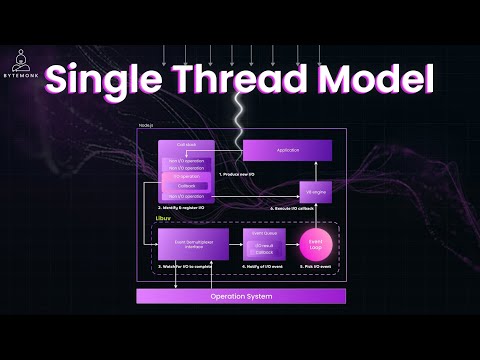
Single-Threaded JS
Your JavaScript code runs on one thread. There's only one call stack. Operations happen one at a time — but Node.js is not slow because of this.
Why this matters in interviews: Interviewers want to know you understand that blocking the main thread kills performance.
02
⚙️
libuv Thread Pool
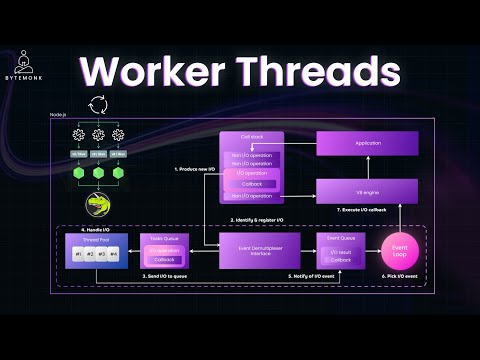
Heavy I/O work (disk, DNS, crypto) is handed off to libuv's C++ thread pool (4 threads by default). The JS thread is free while libuv works in the background.
Why this matters: Node.js isn't truly single-threaded — it's single-threaded for JS, but multi-threaded for I/O.
03
🔁
Event Loop
The Event Loop continuously checks: "Is the call stack empty? Are there callbacks ready?" If yes, it pushes them in. This is how thousands of async operations are managed.
Why this matters: This is the #1 interview topic. Know the phases, microtasks vs macrotasks, and what blocks it.
04
🚀
V8 Engine
Google's V8 compiles JavaScript to machine code (JIT). It handles garbage collection, memory management, and optimizations that make Node fast.
Why this matters: Memory leaks, performance profiling, and heap issues all trace back to V8 internals.
Node.js Architecture — How your code flows
Your JavaScript
app.js
async functions
Promises
→
V8 Engine
JIT compile
Heap memory
GC
→
Event Loop spinning
timers
I/O callbacks
poll
check
→
libuv
Thread Pool (×4)
OS async
Network
→
OS / Kernel
File System
TCP/UDP
DNS
🌱 Beginner
The Fundamentals — Understood Deeply
Not just "what" — but why it works, what happens under the hood, and what interviewers are actually testing.
⏱ 2–4 weeks · Questions tagged with 🎯 appear in interviews
01
📦
Modules: CommonJS vs ES Modules
requireimportmodule.exportspackage.json
The Deep Explanation
Node.js has two module systems that work very differently. Understanding both is critical because most real codebases use one or the other, and mixing them causes painful bugs.
CommonJS (CJS) — the original Node module system. When you call require('./math'), Node reads the file, wraps it in a function, executes it, and returns whatever was assigned to module.exports. It's synchronous — the file is read and executed before the next line runs. This is fine for startup, but terrible inside an async operation.
ES Modules (ESM) — the JavaScript standard. Uses import/export. Key difference: ESM is statically analyzed at parse time, meaning the browser/Node can know all imports before any code runs. This enables tree-shaking (dead code elimination) and top-level await. Set "type": "module" in package.json, or use .mjs extension.
⚠️
Gotcha: You can't require() an ES module. And you can't use import inside a CJS file. They don't mix directly. Use dynamic import() to load ESM from CJS.
// math.js — CommonJS exportfunctionadd(a, b) { return a + b; }
functionmultiply(a, b) { return a * b; }
module.exports = { add, multiply };
// OR: exports.add = add; (same thing)// app.js — CommonJS importconst { add, multiply } = require("./math");
const path = require("path"); // built-inconst express = require("express"); // npm packageconsole.log(add(2, 3)); // 5// What require() actually does under the hood:// 1. Resolves file path// 2. Checks module cache (re-requires are fast!)// 3. Wraps in: (function(exports, require, module, __filename, __dirname) { ... })// 4. Executes the wrapper// 5. Returns module.exports
// math.mjs — ES Module exportexport functionadd(a, b) { return a + b; }
export const PI = 3.14159;
// Named default exportexport default { add, PI };
// app.mjs — ES Module importimport { add } from"./math.mjs"; // namedimport math from"./math.mjs"; // defaultimport * as all from"./math.mjs"; // namespaceimport { createServer } from"node:http"; // built-in (node: prefix)// Top-level await — only available in ESM!const data = await fetch("https://api.example.com/data");
// package.json — enable ESM project-wide// { "type": "module" }
// Dynamic import() — works in both CJS and ESM// Use when you need to load a module conditionallyasync functionloadPlugin(name) {
const plugin = awaitimport(`./plugins/${name}.mjs`);
return plugin.default;
}
// In CJS — load an ES module this way:// const { add } = await import('./math.mjs'); ✅// const { add } = require('./math.mjs'); ❌ throws!// Real use case: lazy load heavy libraries
app.get("/pdf", async (req, res) => {
const { generatePDF } = awaitimport("./pdf-generator.mjs");
res.send(awaitgeneratePDF(req.body));
});
🎯 Interview Questions — Modules
Q: What's the difference between CommonJS and ES Modules?
A: CJS uses require()/exports and is synchronous — the whole file runs at require time. ESM uses import/export and is statically analyzed — imports are resolved before execution, enabling tree-shaking and top-level await. CJS is the Node.js default; ESM requires "type":"module" or .mjs extension.
Q: Why can't you use require() inside an if statement effectively?
A: You can, but it defeats the purpose — require() is synchronous so it blocks. For conditional loading, use dynamic import() which is async and doesn't block the event loop.
Q: How does Node.js module caching work?
A: After a module is first required, Node caches it in require.cache. Subsequent require() calls return the cached object without re-executing the file. This means module-level state (like a database connection) is shared across all importers — a common pattern for singletons.
02
🔁
The Event Loop — Every Phase Explained
libuvmicrotasksmacrotasksnextTickPromises
The Deep Explanation
The Event Loop is a continuous loop that runs while your Node process is alive. It has 6 phases, each with its own FIFO queue. The loop goes through each phase in order, processing callbacks from that queue before moving to the next.
① Timers
Runs callbacks scheduled by setTimeout() and setInterval() whose threshold has passed
↓
② Pending Callbacks
I/O callbacks deferred from the previous loop iteration (e.g. TCP errors)
↓
③ Idle / Prepare
Internal use only. libuv housekeeping
↓
④ Poll ← Most important
Retrieves new I/O events. Executes I/O callbacks (file reads, network responses). Blocks here if the queue is empty and timers aren't ready
↓
⑤ Check
Executes setImmediate() callbacks — always runs after poll, before timers
After each phase (and between individual callbacks within a phase), Node drains two microtask queues in order:
1. process.nextTick() — runs first, before Promises
then
2. Promise .then/.catch — runs after nextTick queue is empty
🚨
Critical Gotcha:process.nextTick() is NOT part of the Event Loop phases. It runs immediately after the current operation completes, before the next phase. Calling nextTick recursively starves the event loop — I/O never gets a chance to run!
// ❌ BLOCKING — never do this in production
app.get("/slow", (req, res) => {
// This blocks the ENTIRE event loop for all users!const start = Date.now();
while (Date.now() - start < 2000) {} // 2 second CPU burn
res.end("done");
});
// ✅ Non-blocking — offload CPU work to Worker Threadconst { Worker } = require("worker_threads");
app.get("/fast", (req, res) => {
const worker = newWorker("./heavy-task.js");
worker.on("message", result => res.json(result));
});
// ✅ fs.readFile is async — doesn't block
app.get("/file", async (req, res) => {
const data = await fs.readFile("./data.json", "utf-8");
// ^^ handed to libuv thread pool, event loop is FREE
res.json(JSON.parse(data));
});
// setImmediate vs setTimeout(fn, 0) — the classic interview trick// Outside of I/O context: order is NON-DETERMINISTICsetTimeout(() => console.log("timeout"), 0);
setImmediate(() => console.log("immediate"));
// Could print either order — depends on system timer precision// Inside an I/O callback: setImmediate ALWAYS wins
fs.readFile("file.txt", () => {
setTimeout(() => console.log("timeout"), 0);
setImmediate(() => console.log("immediate")); // ← always first// Why: After I/O callback, we're in "poll" phase.
// Next phase is "check" (setImmediate), THEN loop back to "timers"
});
// process.nextTick vs setImmediate: choose carefullysetImmediate(() => console.log("after I/O cycle"));
process.nextTick(() => console.log("before I/O cycle")); // ← runs first
🎯 Interview Questions — Event Loop
Q: Node.js is single-threaded. How does it handle 10,000 concurrent connections?
A: Node.js uses a non-blocking I/O model. When an I/O operation (like reading a file or making a network call) is initiated, Node hands it off to libuv's thread pool and continues executing other code. When the I/O completes, the callback is queued and the Event Loop picks it up. This means Node handles many connections by not waiting — it delegates I/O and moves on.
Q: What is the difference between process.nextTick() and setImmediate()?
A: process.nextTick() fires before the Event Loop moves to the next phase — it runs in the "microtask queue" after the current operation. setImmediate() fires in the "check" phase of the current loop iteration. Use nextTick for "before I/O" and setImmediate for "after I/O".
Q: What happens if you block the Event Loop?
A: Every user request is stuck waiting. Since JS is single-threaded, a synchronous CPU-heavy operation (like a while loop or a huge JSON.parse) freezes the entire application — no I/O callbacks run, no timers fire, no new requests are processed. Fix: offload to Worker Threads or a job queue.
Node.js evolved through three generations of async patterns. Understanding all three matters because you'll see all three in real codebases, and interviewers test your ability to convert between them and explain why each exists.
Callbacks (Node style): The original pattern. Functions take a callback as their last argument. By convention, the callback's first argument is an error (err). Called "error-first callbacks" or "Node-style callbacks". The problem: deep nesting creates "Callback Hell" — impossible to read, debug, or test.
Promises: A Promise is an object representing a future value. It's either pending, fulfilled, or rejected. Promises chain with .then() and .catch() — solving nesting but introducing a new mental model. Promise.all() runs multiple in parallel; Promise.allSettled() waits for all regardless of failure.
async/await: Syntactic sugar over Promises. An async function always returns a Promise. await pauses the function until the Promise resolves — but does NOT block the event loop; Node runs other code while waiting. Always wrap in try/catch — unhandled Promise rejections crash the process in Node 15+.
💡
Mental Model for await: Think of await as "take a number and sit down." The function pauses, but Node.js goes to serve other customers. When your async work is done, the Event Loop calls your number and resumes from where you left off.
// ✅ Promises — flat chaininggetUser(userId)
.then(user => getPosts(user.id))
.then(posts => getComments(posts[0].id))
.then(comments => saveReport(comments))
.then(result => console.log("Done:", result))
.catch(err => handleError(err)); // ONE error handler for all// Creating a Promise from scratchfunctiondelay(ms) {
return new Promise((resolve, reject) => {
setTimeout(resolve, ms);
// Call reject(err) to fail the promise
});
}
// Promisify a callback-based functionconst { promisify } = require("util");
const readFile = promisify(fs.readFile);
const content = awaitreadFile("file.txt", "utf-8");
// ✅ async/await — reads like synchronous codeasync functionloadDashboard(userId) {
try {
const user = awaitgetUser(userId);
const posts = awaitgetPosts(user.id);
const comments = awaitgetComments(posts[0].id);
const result = awaitsaveReport({ user, posts, comments });
return result;
} catch (err) {
// Catches ALL errors from any await aboveconsole.error("Dashboard load failed:", err.message);
throw err; // Re-throw if caller needs to know
}
}
// Common mistake: forgetting await → no error catching!async functionbad() {
const data = fetchUser(); // ← MISSING await! data = Promise, not value
}
// Sequential (slow) — each awaits the previousconst user = awaitgetUser(id); // 100msconst profile = awaitgetProfile(id); // 100msconst posts = awaitgetPosts(id); // 100ms// Total: ~300ms// ✅ Parallel (fast) — Promise.all starts all at onceconst [user, profile, posts] = await Promise.all([
getUser(id),
getProfile(id),
getPosts(id),
]);
// Total: ~100ms (limited by slowest)// Promise.allSettled — don't fail if one rejectsconst results = await Promise.allSettled([fetchA(), fetchB()]);
results.forEach(r => {
if (r.status === "fulfilled") use(r.value);
else logError(r.reason);
});
// Promise.race — first to resolve/reject winsconst data = await Promise.race([fetch(url), timeout(5000)]);
🎯 Interview Questions — Async Patterns
Q: Does await block the Node.js event loop?
A: No — this is a common misconception. await suspends the current async function, but Node.js is free to run other code (other requests, callbacks, timers) while waiting. It's only blocking if you use synchronous operations like fs.readFileSync().
Q: What happens when a Promise is rejected and not caught?
A: In Node.js 15+, an unhandled Promise rejection crashes the process with exit code 1. In older versions, it emitted a warning. Always handle rejections with .catch() or try/catch with await. Add a global safety net: process.on('unhandledRejection', handler).
Q: When would you use Promise.all vs Promise.allSettled?
A: Use Promise.all when ALL promises must succeed — it rejects immediately if any fail (fail-fast). Use Promise.allSettled when you want to attempt all operations regardless — you get results for each, whether fulfilled or rejected. Example: refreshing multiple API feeds where partial success is acceptable.
⚡ Intermediate
Core Node.js Internals & Patterns
The topics that separate competent from excellent Node.js developers — and that senior interviews always probe.
⏱ 3–5 weeks · Heavy interview weight
04
🌊
Streams — The Right Way to Move Data
ReadableWritableDuplexTransformpipebackpressure
The Deep Explanation
Streams are one of Node.js's most powerful — and most misunderstood — features. A stream is an abstract interface for working with streaming data: data that arrives or is sent piece by piece (in chunks) rather than all at once.
Without streams: reading a 1GB video file means loading 1GB into RAM before doing anything. With streams: you read 64KB at a time, process it, and free the memory before the next chunk arrives. Your app uses ~64KB of RAM instead of 1GB.
net.Socket — can both read and write simultaneously
🔄
Transform
zlib.createGzip(), crypto.createCipher() — modify data as it passes through
⚠️
Backpressure — the #1 stream gotcha: If you read faster than you write, data piles up in memory. pipe() handles this automatically — it pauses the Readable when the Writable's buffer is full and resumes when it drains. If you manually handle stream events without respecting backpressure, you'll get memory leaks.
// Streaming a large file as HTTP response// Without stream: reads entire file into memory, THEN sends// With stream: sends while reading — uses ~64KB RAM, not file size
app.get("/download", (req, res) => {
const filePath = "./huge-dataset.csv";
const stat = fs.statSync(filePath);
res.setHeader("Content-Type", "text/csv");
res.setHeader("Content-Length", stat.size);
// pipe the file directly into the response stream
fs.createReadStream(filePath).pipe(res);
});
// Streaming from a database (cursor-based)
app.get("/users.ndjson", (req, res) => {
res.setHeader("Content-Type", "application/x-ndjson");
const cursor = db.collection("users").find();
cursor.on("data", doc => res.write(JSON.stringify(doc) + "\n"));
cursor.on("end", () => res.end());
});
🎯 Interview Questions — Streams
Q: What is backpressure in Node.js streams and why does it matter?
A: Backpressure occurs when a Readable stream produces data faster than a Writable can consume it. Without handling it, data accumulates in memory — a leak. pipe() automatically pauses the Readable when the Writable's internal buffer exceeds its highWaterMark, and resumes when it drains. If you bypass pipe(), you must manually check writable.write()'s return value and listen to the 'drain' event.
Q: When would you use a Transform stream?
A: Transform streams sit between a Readable and Writable, modifying data as it passes through. Real uses: compressing data (zlib), encrypting/decrypting, parsing (CSV/JSON lines), logging, adding headers, format conversion. They're powerful because they keep memory constant regardless of data volume.
05
🛡️
Error Handling — A Complete Strategy
try/catchdomainsprocess eventsoperational vs programmer errors
The Deep Explanation
Error handling in Node.js is a layered strategy. There are two types of errors, and you handle them very differently:
Operational errors: expected failures in a correct program. A network request times out, a file doesn't exist, a user sends invalid input, the database goes down. These should be caught and handled gracefully — return a 4xx/5xx, log them, maybe retry.
Programmer errors: bugs in your code. Calling a function with the wrong type, accessing undefined, off-by-one. These should crash the process and be fixed — don't try to recover; the process is in an unknown state. Use a process manager (PM2) to restart automatically.
🚨
Never swallow errors silently:catch(err) {} is the most dangerous pattern in Node.js. It hides bugs and makes debugging impossible. At minimum: catch(err) { console.error(err); throw err; }
// Layer 1: try/catch for async functionsasync functiongetUser(id) {
try {
const user = await db.findById(id);
if (!user) throw new NotFoundError(`User ${id} not found`);
return user;
} catch (err) {
logger.error({ err, userId: id }, "getUser failed");
throw err; // always re-throw or handle completely
}
}
// Layer 2: Unhandled Promise rejections
process.on("unhandledRejection", (reason, promise) => {
logger.fatal({ reason }, "Unhandled rejection");
process.exit(1); // let PM2/Docker restart us
});
// Layer 3: Synchronous uncaught exceptions
process.on("uncaughtException", (err) => {
logger.fatal({ err }, "Uncaught exception — shutting down");
// Do NOT try to continue — state is unknown
process.exit(1);
});
Q: What's the difference between operational errors and programmer errors? How do you handle each?
A: Operational errors are expected in correct programs (network failure, invalid user input, file not found). Handle them gracefully — catch, log, return appropriate response. Programmer errors are bugs (TypeError, ReferenceError). Don't catch and continue — the process is in an unknown state. Crash and restart via PM2/Docker. Never catch all errors uniformly; distinguish between them.
Q: How do you handle errors in Express async route handlers?
A: Express doesn't catch async errors by default — if an async route throws, it hangs. You must either: (1) wrap with a higher-order asyncHandler utility that calls next(err), or (2) manually catch and call next(err). The error then flows to your 4-argument error middleware. Express 5 (RC) handles this automatically.
🔥 Advanced
Scaling, Performance & Production Patterns
What separates senior engineers — deep internals, performance thinking, and real-world architectural decisions.
⏱ 4–8 weeks · Senior engineer territory
06
🧵
Child Processes, Worker Threads & Cluster
spawnforkexecworker_threadsclusterIPC
The Deep Explanation
Node.js has three ways to run code in parallel, each for different use cases. Confusing them is a senior-level interview fail.
Method
Separate process?
Shared memory?
Best for
child_process.exec/spawn
✅ Yes
❌ No
Running shell commands, external programs
child_process.fork
✅ Yes (Node.js)
❌ No (IPC only)
Spawning another Node.js script with messaging
worker_threads
❌ Same process
✅ SharedArrayBuffer
CPU-heavy JS work (image processing, ML)
cluster
✅ Yes (same port)
❌ No
Scaling HTTP server across all CPU cores
const { exec, spawn } = require("child_process");
// exec — buffers output, good for small resultsexec("ls -la", (err, stdout, stderr) => {
if (err) returnconsole.error(err);
console.log(stdout);
});
// spawn — streams output, good for large/long-runningconst ls = spawn("ls", ["-la", "/usr"]);
ls.stdout.on("data", data => process.stdout.write(data));
ls.stderr.on("data", data => console.error(data.toString()));
ls.on("close", code => console.log(`Exited: ${code}`));
// ⚠️ NEVER use exec with user input — shell injection risk!// exec(`ls ${userInput}`) ← dangerous if userInput = "; rm -rf /"// spawn("ls", [userInput]) ← safe — args are never shell-interpreted
// main.js — offload CPU work to a threadconst { Worker, isMainThread, parentPort, workerData }
= require("worker_threads");
if (isMainThread) {
// Main thread — runs your web serverconst runTask = (data) => new Promise((resolve, reject) => {
const w = newWorker(__filename, { workerData: data });
w.on("message", resolve);
w.on("error", reject);
w.on("exit", code => {
if (code !== 0) reject(new Error(`Worker exited: ${code}`));
});
});
// Event loop NOT blocked while worker computes
app.get("/compute", async (req, res) => {
const result = awaitrunTask({ n: 45 });
res.json({ result });
});
} else {
// Worker thread — runs CPU-heavy computationfunctionfib(n) { return n < 2 ? n : fib(n-1) + fib(n-2); }
parentPort.postMessage(fib(workerData.n));
}
const cluster = require("cluster");
const http = require("http");
const os = require("os");
if (cluster.isPrimary) {
const numCPUs = os.cpus().length; // e.g. 8console.log(`Primary ${process.pid} forking ${numCPUs} workers`);
for (let i = 0; i < numCPUs; i++) cluster.fork();
cluster.on("exit", (worker, code) => {
console.log(`Worker ${worker.process.pid} died (code ${code}). Restarting.`);
cluster.fork(); // auto-restart crashed workers
});
} else {
// Each worker is a full Node.js process with its own event loop
http.createServer((req, res) => {
res.end(`Worker ${process.pid} handled this\n`);
}).listen(3000);
// OS load-balances incoming connections across workers// PM2 alternative: pm2 start app.js -i max
}
🎯 Interview Questions — Concurrency
Q: What's the difference between cluster and worker_threads?
A: cluster creates separate OS processes — each has its own memory, event loop, and V8 instance. They communicate via IPC. Best for scaling an HTTP server across CPU cores. worker_threads creates threads within the same process — they can share memory via SharedArrayBuffer. Best for CPU-intensive tasks within a single request (image processing, ML inference). Key: cluster = horizontal scaling of requests; worker_threads = vertical scaling of a single task.
Q: What is spawn vs exec vs fork in child_process?
A: exec runs a shell command and buffers all output — easy but dangerous with user input (shell injection) and bad for large output. spawn runs a command directly without a shell and streams output — safer and memory-efficient. fork is like spawn but specifically for spawning another Node.js file with built-in IPC messaging between parent and child.
V8 divides memory into two areas: the stack (primitive values, references) and the heap (objects, closures, buffers). The garbage collector (GC) automatically frees heap objects with no references — but it has to stop-the-world to do it, causing latency spikes.
Memory leaks in Node.js happen when you hold references to objects longer than needed. The GC can't free them even though you're "done" with them. Common culprits: global variables, event listeners not removed, closures holding large data, caches with no eviction policy.
⚠️
Default heap size is ~1.5GB. In production, set it explicitly: node --max-old-space-size=4096 app.js. Monitor with process.memoryUsage(). Profile with Chrome DevTools or node --inspect.
// ❌ Leak 1: Global variable accumulationconst cache = {};
app.get("/data", (req, res) => {
cache[req.query.id] = fetchExpensiveData(); // NEVER evicted!
});
// ❌ Leak 2: Event listener not removedfunctionprocessRequest(req) {
process.on("message", handleMessage); // adds listener every call!// Fixed: process.once() or remove listener when done
}
// ❌ Leak 3: Closure holding large datafunctionmakeAdder() {
const hugeArray = new Array(1_000_000).fill("data");
return (x) => x + hugeArray.length; // hugeArray can't be GC'd
}
// ❌ Leak 4: Timers not clearedfunctionstartPolling(emitter) {
const id = setInterval(() => {
emitter.emit("poll"); // holds ref to emitter forever
}, 1000);
// Must return id and clearInterval when done!
}
// Check memory usage programmaticallyconst used = process.memoryUsage();
console.log({
heapUsed: (used.heapUsed / 1024 / 1024).toFixed(2) + " MB",
heapTotal: (used.heapTotal / 1024 / 1024).toFixed(2) + " MB",
rss: (used.rss / 1024 / 1024).toFixed(2) + " MB",
external: (used.external / 1024 / 1024).toFixed(2) + " MB",
});
// heapUsed = JS objects in use
// heapTotal = total heap allocated
// rss = Resident Set Size (entire process memory)
// external = C++ objects linked to JS (Buffers)// Monitor periodically — alert if heap grows too fastsetInterval(() => {
const { heapUsed } = process.memoryUsage();
if (heapUsed > 500 * 1024 * 1024) {
logger.warn("High heap usage!", { heapMB: heapUsed/1024/1024 });
}
}, 30_000);
// Debug with Chrome DevTools:
// $ node --inspect app.js
// Open chrome://inspect → heap snapshots → compare over time
// ✅ Fix 1: Bounded cache with LRU evictionconst LRU = require("lru-cache");
const cache = newLRU({ max: 500, ttl: 1000 * 60 * 5 }); // 500 items, 5min TTL// ✅ Fix 2: Remove event listenersconst handler = () => { /* ... */ };
emitter.on("event", handler);
// later...
emitter.off("event", handler); // or: emitter.removeListener// Or use once() for fire-once handlers
emitter.once("event", handler); // auto-removed after first call// ✅ Fix 3: WeakMap for private data (GC-friendly)const privateData = new WeakMap();
classMyClass {
constructor() { privateData.set(this, { secret: "hidden" }); }
getSecret() { return privateData.get(this).secret; }
// When `this` is GC'd, WeakMap entry is automatically removed
}
🎯 Interview Questions — Memory & Performance
Q: How do you diagnose a memory leak in a production Node.js application?
A: (1) Monitor process.memoryUsage().heapUsed over time — if it grows steadily without leveling off, you have a leak. (2) Take heap snapshots using --inspect and Chrome DevTools: take snapshot 1, reproduce the leak, take snapshot 2, compare — the objects growing are your culprits. (3) Use tools like clinic.js, heapdump, or memwatch-next for production. Common culprits: unbounded caches, unremoved event listeners, closures holding large data.
Q: What causes stop-the-world GC pauses in Node.js?
A: V8's garbage collector needs to pause JS execution to safely traverse and free objects in the old generation heap. Large heap sizes mean longer GC pauses. Mitigation: keep heap small (evict caches), use streaming to avoid large allocations, use Buffer for binary data (outside V8 heap), and tune GC with flags like --max-old-space-size.
🎯 Interview Prep
The Questions That Actually Get Asked
Curated from real interviews at top tech companies. Answers you should be able to say out loud, not just read.
⚡ Quick Fire — Junior Level
What is Node.js and why is it not a programming language?
Node.js is a JavaScript runtime environment — it's a platform that lets you run JavaScript outside the browser, built on Chrome's V8 engine. JavaScript is the language; Node.js provides the environment (file system, network, OS access) that browsers don't expose.
What is the difference between require() and import?
require() is CommonJS — synchronous, cached, available everywhere. import is ESM — statically analyzed at parse time, async-capable (top-level await), supports tree-shaking. ESM is the JavaScript standard; CJS is Node.js's historical system.
What is package.json and what is package-lock.json?
package.json declares your project's metadata, dependencies (with semver ranges), and scripts. package-lock.json is auto-generated and locks the exact versions of every installed package and its transitive dependencies — ensures reproducible installs across machines. Always commit it.
What is the difference between dependencies and devDependencies?
dependencies are packages needed at runtime (express, lodash). devDependencies are only needed during development/testing (jest, eslint, nodemon). Running npm install --production skips devDependencies — important for smaller Docker images.
🔥 Deep Dive — Mid/Senior Level
Explain the Node.js Event Loop phases in order.
6 phases in order: (1) Timers — executes setTimeout/setInterval callbacks. (2) Pending Callbacks — I/O callbacks from previous loop. (3) Idle/Prepare — internal use. (4) Poll — retrieves new I/O events; blocks here if nothing else is pending. (5) Check — executes setImmediate(). (6) Close Callbacks — socket.on('close'). Between each phase: drains process.nextTick() queue, then Promise microtask queue.
How does Node.js achieve non-blocking I/O if JavaScript is single-threaded?
Node.js delegates I/O operations to libuv, which has a thread pool (default 4 threads) and uses OS-level async APIs (epoll on Linux, kqueue on macOS, IOCP on Windows). When I/O completes, libuv puts the callback on the Event Loop queue. The JS thread never waits — it processes other callbacks until the I/O result is ready.
What is backpressure in streams, and how do you handle it?
Backpressure is when a consumer (Writable) is slower than a producer (Readable). Unhandled, data buffers in memory → heap growth → OOM crash. Solution: use pipe() which automatically pauses the Readable when writable.write() returns false, and resumes on the 'drain' event. For manual handling: check write's return value and listen to drain.
How would you structure a Node.js application for production?
Layered architecture: (1) Routes — HTTP interface only, no business logic. (2) Controllers — validate input, call services. (3) Services — business logic, framework-agnostic. (4) Repositories/DAOs — data access layer. Plus: centralized error handling, environment config via dotenv, structured logging (pino/winston), health check endpoints, graceful shutdown handler, and cluster/PM2 for production scaling.
What is a memory leak in Node.js and how do you find one?
A memory leak is when objects are retained in memory longer than needed because references are held. Common causes: globals, unbounded caches, unremoved event listeners. Detection: monitor heapUsed over time with process.memoryUsage(). Debug: run with --inspect, take heap snapshots in Chrome DevTools, compare before/after — growing object types are the source. Tools: clinic.js, heapdump npm package.
What is graceful shutdown and why does it matter?
Graceful shutdown means: on SIGTERM/SIGINT, stop accepting new connections, finish in-flight requests, close DB connections and cleanup, then exit. Without it, killing the process drops active requests → errors for users. Implementation: listen to SIGTERM, call server.close(), wait for connections to drain, then exit. PM2 sends SIGINT before force-killing — your app has a window to shut down cleanly.
🧠 System Design Thinking
When would you NOT use Node.js?
Node.js is poor for: (1) CPU-intensive workloads (image/video processing, ML training, complex computation) — single thread gets blocked. (2) Applications needing multi-threaded CPU parallelism — Go or Java/Kotlin are better. (3) Heavy computation per request — Python/C++ may be faster. Node.js shines at: I/O-bound tasks, real-time apps, microservices, API gateways, BFF (Backend for Frontend) layers.
How would you handle database connections in a clustered Node.js app?
Each cluster worker is a separate process, so each creates its own connection pool. This means 8 workers × 10 pool connections = 80 DB connections. Mitigation: (1) Use a connection pooler like PgBouncer between Node and Postgres. (2) Reduce pool size per worker. (3) Use a centralized connection manager / service. For worker_threads, connections can potentially be shared via SharedArrayBuffer but it's complex — generally don't share DB connections across threads.
The clearest visual explanation of how Node.js handles thousands of concurrent connections on a single thread. Covers the V8 engine, libuv thread pool, and the magic of non-blocking I/O. Watch this before reading the Event Loop section.
What the heck is the event loop anyway? | Philip Roberts | JSConf EU
Philip Roberts·@philip_roberts
JavaScript programmers like to use words like, “event-loop”, “non-blocking”, “callback”, “asynchronous”, “single-threaded” and “concurrency”.We say things like “don’t block the event loop”, “make sure your code runs at 60 frames-per-second”, “well of course, it won’t work, that function is an asynchronous callback!”