




- 🤖 Introduction
- ⚙️ Tech Stack
- 🔋 Features
- 🤸 Quick Start
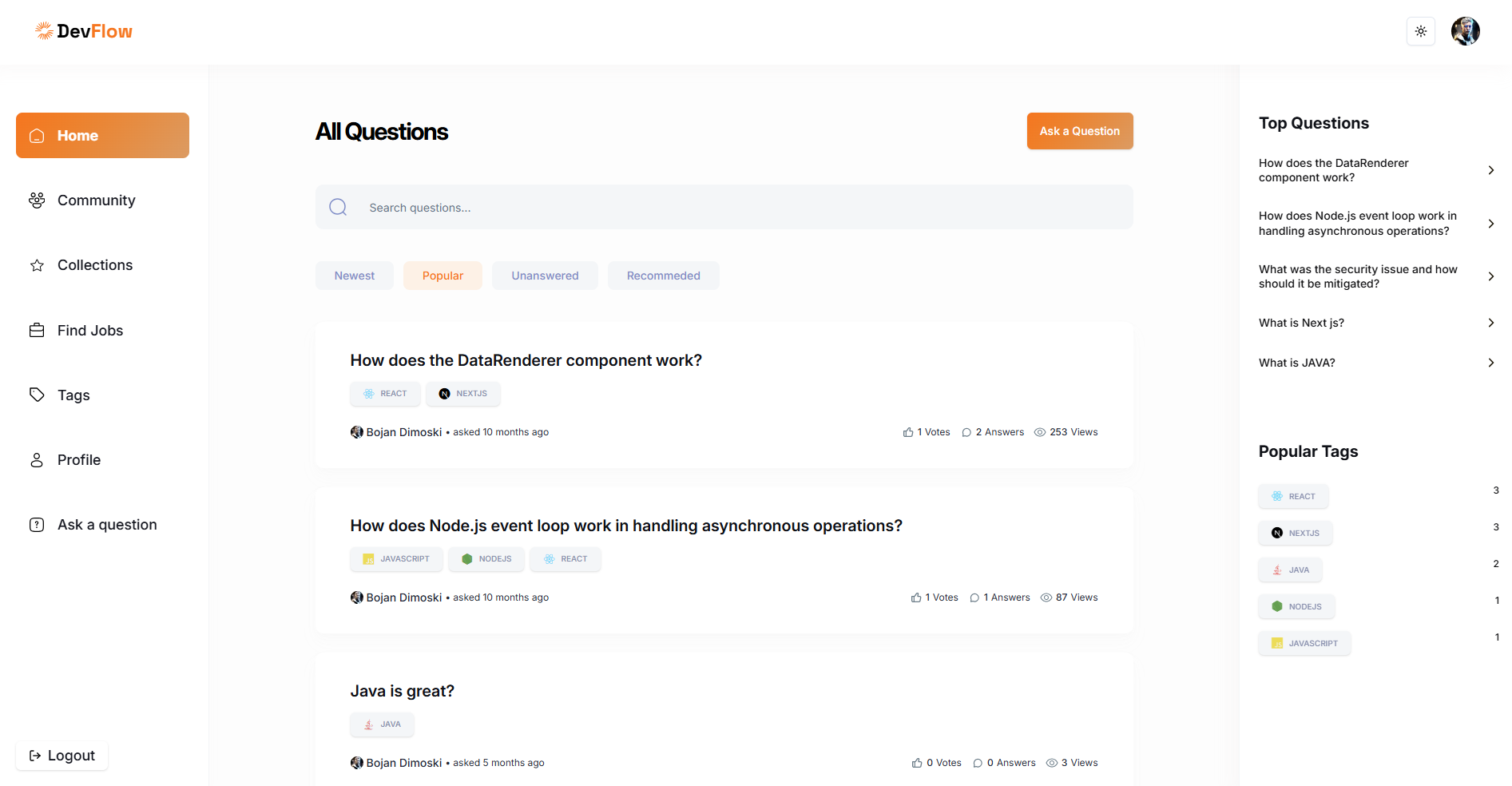
DevFlow is a modern developer community platform built with Next.js 15, featuring a Stack Overflow-inspired Q&A system with AI-powered answer generation. It provides developers with a platform to ask questions, share knowledge, build collections, discover jobs, and engage with a vibrant community. The application leverages cutting-edge technologies including React Server Components, NextAuth for authentication, MongoDB for data persistence, and OpenAI's GPT-4 for intelligent answer suggestions.
- Next.js 15 - React framework with App Router and Server Components
- TypeScript - Type-safe development
- Tailwind CSS - Utility-first CSS framework
- MongoDB & Mongoose - Database and ODM
- NextAuth v5 - Authentication with GitHub, Google, and credentials
- OpenAI GPT-4 - AI-powered answer generation
- Radix UI - Accessible component primitives
- React Hook Form & Zod - Form handling and validation
- MDX Editor - Rich text editing for questions and answers
- Vercel AI SDK - AI integration utilities
👉 Question & Answer System: Post questions, provide detailed answers with rich text formatting using MDX editor
👉 AI-Powered Answers: Get intelligent answer suggestions powered by OpenAI's GPT-4 Turbo model
👉 Authentication: Multiple sign-in options including GitHub, Google OAuth, and email/password credentials
👉 User Profiles: Personalized profiles with activity tracking, reputation system, and contribution history
👉 Collections: Save and organize favorite questions for easy reference
👉 Tag System: Browse questions by technology tags with a comprehensive tech icon map (JavaScript, TypeScript, React, Next.js, Python, Java, and more)
👉 Community Features: Explore developer community, view member profiles, and engage with other developers
👉 Search & Filters: Advanced search capabilities with multiple filtering options (newest, popular, unanswered, recommended)
👉 Voting System: Upvote and downvote questions and answers to surface quality content
👉 Job Board: Browse developer job opportunities
👉 Dark/Light Mode: Theme switching with next-themes for comfortable viewing
👉 Responsive Design: Fully responsive layout that works seamlessly across all devices
👉 Real-time Interactions: Track views, votes, and answers with live updates
and many more, including code architecture, reusability, and modern development practices
Follow these steps to set up the project locally on your machine.
Prerequisites
Make sure you have the following installed on your machine:
- Git
- Node.js (v18 or higher)
- npm (Node Package Manager)
- MongoDB (local installation or MongoDB Atlas account)
Cloning the Repository
git clone https://github.com/bdimoski/devflow.git
cd devflow
Installation
Install the project dependencies using npm:
npm installSet Up Environment Variables
Create a .env.local file in the root directory and add the following environment variables:
# MongoDB
MONGODB_URI=your_mongodb_connection_string

# NextAuth
AUTH_SECRET=your_auth_secret
AUTH_GITHUB_ID=your_github_oauth_client_id
AUTH_GITHUB_SECRET=your_github_oauth_client_secret
AUTH_GOOGLE_ID=your_google_oauth_client_id
AUTH_GOOGLE_SECRET=your_google_oauth_client_secret

# OpenAI
OPENAI_API_KEY=your_openai_api_key

# App URL
NEXT_PUBLIC_APP_URL=http://localhost:3000
Replace the placeholder values with your actual credentials:
- Get MongoDB connection string from MongoDB Atlas
- Generate AUTH_SECRET using:
openssl rand -base64 32(Unix/Mac) or any secure random string generator - Get GitHub OAuth credentials from GitHub Developer Settings
- Get Google OAuth credentials from Google Cloud Console
- Get OpenAI API key from OpenAI Platform
Running the Project
npm run devOpen http://localhost:3000 in your browser to view the project.
Build for Production
npm run build
npm start