
How cubic works
Standard signups start with a 7-day free trial:- AI reviews included during the trial period
- Full platform access to all features
- No credit card required to get started
- Continue free: Get 20 AI reviews per month with full platform access
- Upgrade to paid: Get AI reviews with the same full platform access
Free plan
Get started with cubic immediately—no credit card required:- Unlimited platform access: View and manage all your pull requests in cubic
- 20 AI reviews per month: Get intelligent feedback on your most important PRs across all repositories
- Full feature access: Analytics, code reviews, issue tracker integrations, background agents, and more;
- Monthly quota reset: Your AI review limit resets on the 1st of each month
How the free plan quota works
- Organization-wide limit: The 20 AI reviews per month are shared across all repositories in your GitHub organization
- Automatic tracking: AI review comments show how many reviews you have remaining
- Monthly reset: Your quota automatically resets to 20 on the 1st of each month
Paid subscriptions
For paid AI review access, cubic’s subscription cost is determined by the number of developer seats you choose to activate. Each active seat corresponds to a unique GitHub user within your organization. AI review usage on paid plans is measured in reviewed lines, with an allowance per paid seat that is pooled across your team.- Seat-based billing: You are billed based on the number of active seats you assign to your team members (GitHub users).
- Flexible seat management: You can manage seat assignments at any time, both during your free trial and after it ends.
- Customizable checkout: When you purchase a subscription, you select the exact number of seats you need.
- Ultrareview: Pro plans include Ultrareview for high-risk or complex PRs. Ultrareviews count toward your team’s reviewed-lines allowance at 3× the standard rate.
- Subscription management: Seat assignments and active seats can be viewed and managed through the subscription tab in your settings: https://www.cubic.dev/settings?tab=subscription
Flex capacity
Paid workspaces can use flex capacity to keep GitHub PR AI reviews running after included reviewed-line usage runs out. Flex capacity costs $30 per 10,000 extra reviewed lines and is billed only when cubic needs extra capacity for a review. Admins set a monthly spend limit in Settings → Subscription. cubic never spends past that limit; if the next required purchase would exceed the limit, reviews pause until you raise the limit or the billing period resets.Automatic seat management
Admins can enable automatic seat management to handle team changes automatically. When enabled in your subscription settings, cubic will automatically assign and remove seats as your team changes. How it works:- When a new developer joins your GitHub organisation, they’ll automatically get a cubic seat. You’ll see this reflected in your billing.
- If a developer leaves your organisation, their seat is removed and you’ll stop being billed for them.
- If you’ve already given seats to 3 out of 10 developers, and then turn on automatic assignment, the next (11th) developer who joins will automatically get a seat—bringing your total to 4.
- This gives you flexibility to mix and match manual and automatic seat assignment, based on what works best for your team.
Bot seat management
Devin-bot support
cubic recognizes and provides special handling for automated coding assistants like Devin. When Devin opens a pull request in your repository:- Automatic detection: PRs authored by
devin-ai-integration[bot]are automatically identified. - Dedicated bot row: Devin is assigned a bot row that’s kept separate from regular developer seats.
- No paid developer seat: Enabling the bot allows its PRs to receive AI reviews without increasing your paid developer seat count.
- Shared reviewed-line allowance: Bot-authored reviews use the same pooled reviewed-line allowance as the rest of your team.
- No manual configuration needed: The system automatically creates and manages the Devin bot seat when it first contributes to your repository.
Free trial
During the free trial period, you can assign as many developer seats as you like to evaluate cubic with your team. When you choose a paid plan at checkout, billing starts immediately and is based on the number of seats you select. If you have any further questions about billing, please contact support.Frequently asked questions
How do I assign seats to specific developers?
How do I assign seats to specific developers?
To choose paid seats, go to Settings → Subscription and click “Upgrade”.
- Choose Seat Count: At checkout, on the left side of the checkout page, specify the total number of developer seats you need.
- Assign Seats: After purchasing, return to Settings → Subscription. You’ll find a list of your GitHub organization members with several ways to manage seats:
Individual seat assignment
- Toggle the switch next to each developer’s name to assign or unassign their seat
- Changes take effect immediately
Bulk seat assignment
- Select multiple users using the checkboxes next to their names
- Click “Update seat status” in the bulk action bar
- Choose “Assign seats to X users” or “Unassign seats from X users”
If you see a “Manage Subscription” button instead of “Upgrade,” you may need to cancel your initial trial subscription via Stripe before proceeding.
Is there an annual plan?
Is there an annual plan?
Yes. We offer an annual subscription at a 20% discount off the monthly rate.
Simply select “12 months” on the checkout page, and the discount will apply
automatically.
Where can I apply a coupon code?
Where can I apply a coupon code?
You can enter your coupon or promo code on the subscription checkout screen: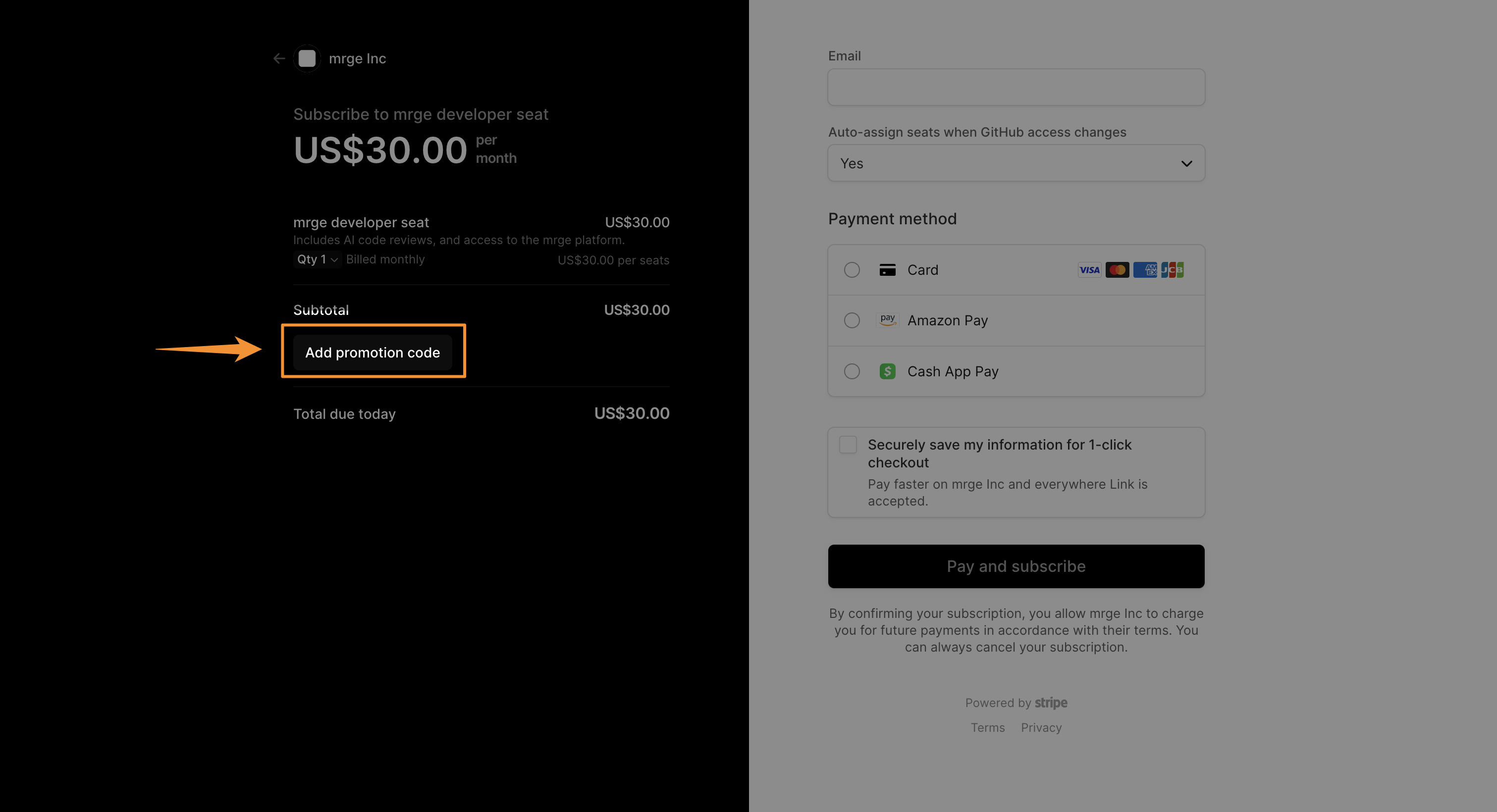
Can I cancel my plan at any time?
Can I cancel my plan at any time?
Absolutely. You can cancel your subscription at any time from Settings →
Subscription → Manage plan. You’ll keep full access until the end of your
current billing period; after that you won’t be billed again.
How do I upgrade or downgrade seats mid-cycle?
How do I upgrade or downgrade seats mid-cycle?
To change your seat count after your subscription has started, go to
Settings → Subscription
and click on Manage plan. This will direct you to our billing portal
(Stripe) where you can adjust the number of seats. Prorated charges or
credits will be applied based on your changes.
What payment methods do you accept?
What payment methods do you accept?
We currently accept all major credit cards (Visa, MasterCard, American
Express) and PayPal. For enterprise customers, we also support ACH bank
transfers—just reach out to support to get set up.
Do you offer discounts for nonprofits or educational institutions?
Do you offer discounts for nonprofits or educational institutions?
Yes! We’re proud to support nonprofits and schools with a special 50%
discount. Please contact
support to verify your
eligibility.
Do you offer free plans for open source projects?
Do you offer free plans for open source projects?
cubic is automatically free for all public repositories. You don’t need to
contact us or apply - just install cubic on your public repositories and
start using it immediately at no cost. Very high-volume usage may be subject
to fair-use limits.
How is pricing calculated if I add seats mid-cycle?
How is pricing calculated if I add seats mid-cycle?
When you increase seats, we calculate the unused portion of your month and
charge only for the prorated difference. If you remove seats, your credit
will apply to your next invoice.
How do paid AI review limits work?
How do paid AI review limits work?
Paid AI review usage is measured in reviewed lines rather than a fixed number of reviews.Your allowance is pooled across all paid seats on your team, so each paid seat adds to a shared monthly usage pool.Most teams never get close to these limits unless they are among the heaviest AI users.In practice, that means a 1- or 2-person team shipping a very high volume of code is more likely to approach the limit than a 20-person team, because the larger team has a much bigger shared pool.
How does flex capacity billing work?
How does flex capacity billing work?
Flex capacity is optional extra reviewed-line capacity for paid workspaces. It costs $30 per 10,000 extra reviewed lines, is charged only when a review needs more capacity, and stops at the monthly spend limit an admin sets. See Flex capacity for detailed examples.
What counts as a reviewed line?
What counts as a reviewed line?
Reviewed lines are the PR code changes cubic actually reviews, not repository size, total file size, or lines generated by AI. For most PRs, this means the added and deleted lines in the diff that cubic reads during review.Generated files, vendored code, binaries, ignored files, skipped files, and failed or cancelled reviews do not count. Incremental reviews only count newly reviewed changes; manual reruns count again. For more detail, see AI review usage and limits.
What happens when my free trial ends?
What happens when my free trial ends?
During your 7-day trial: You get AI reviews and full platform access.When your trial ends: You automatically transition to cubic’s free plan, which includes:
- 20 AI reviews per month (resets monthly)
- Unlimited platform access (same as trial)
- All features remain available (analytics, PR management, notifications, etc.)
Is there a free plan?
Is there a free plan?
Yes! cubic offers a permanent free plan with 20 AI reviews per month and unlimited
access to the platform. This includes all features like analytics, stacked PRs, and
notifications. Only the number of AI reviews per month is limited—everything else is
unlimited. Perfect for personal projects and small teams getting started.
How do I manage who is assigned a seat?
How do I manage who is assigned a seat?
In Settings → Subscription, admins have multiple ways to manage seat assignments:Individual management:
- Toggle the switch next to any team member to assign/unassign their seat
- Changes apply instantly
- Select multiple users with checkboxes
- Use “Update seat status” dropdown to assign or unassign seats for all selected users
- Perfect for onboarding new teams or managing large groups
Members and viewers can view the team list but cannot change seats or roles. Only admins see checkboxes and management controls.
How do team roles work?
How do team roles work?
cubic has three roles: Admin, Member, and Viewer.Admins can manage seats, change user roles, configure auto-assign settings, and manage billing.
Members have full access to all cubic features and can manage non-billing settings, but they cannot change seats, roles, or billing details.
Viewers can view cubic settings and review surfaces, but they cannot change settings, integrations, seats, roles, or billing details.The first user who creates an installation becomes an admin automatically. You need
at least one admin per team, and admins cannot remove their own admin role. Bot
accounts cannot be promoted to admin.See the Roles and permissions page for complete details.
How are bot seats handled?
How are bot seats handled?
cubic automatically detects and manages seats for recognized bots like Devin
(
devin-ai-integration[bot]). These bot seats are:- Created automatically when the bot first opens a PR
- Not billed as developer seats when enabled
- Disabled by default but can be enabled if you want the bot’s PRs to receive AI reviews
- Counted against your normal reviewed-line allowance when their PRs are reviewed
- Visible in your subscription settings alongside regular team members